Every business gets the same questions again and again. "Are you open on Sunday?" "Do you deliver to my area?" "How much does it cost?" A chatbot app answers them instantly, at any hour, and passes the harder ones to a person. This guide explains what chatbot app development involves, how a business chatbot actually works, and where it helps companies and the agencies that serve them.
Last updated: 21 October 2026. This is general guidance from our own project experience. Timelines and results depend on your content, your channels and how you set the bot up, so we quote no guaranteed numbers.
The short version
- A chatbot app is software that talks to your customers on your website, in a messaging app or inside your product, and answers from your own information.
- The good ones are narrow and honest. They answer from approved content, can show where an answer came from, and hand over to a person when they are not sure.
- They help most with repeat work: support questions, lead capture, bookings and quote requests, and internal helpdesks.
- Agencies can resell them. One chatbot per client, trained on that client's own content, is a natural recurring service.
- Start small. One use case, measured properly, beats a bot that tries to do everything.
What is a chatbot app?
A chatbot app is a piece of software that holds a conversation in text, and sometimes voice, with a visitor, customer or staff member. Older chatbots followed fixed scripts and broke when people phrased things differently. Modern ones use an AI language model to understand what the person means, and they look up the answer in your own content, such as your website, help articles and policies.
That last part matters. A chatbot that answers from the open internet will sometimes sound confident and be wrong. A chatbot that answers from approved company content, and says "I am not sure, let me get a person" when it cannot find the answer, is far safer for a business.
How a business chatbot works
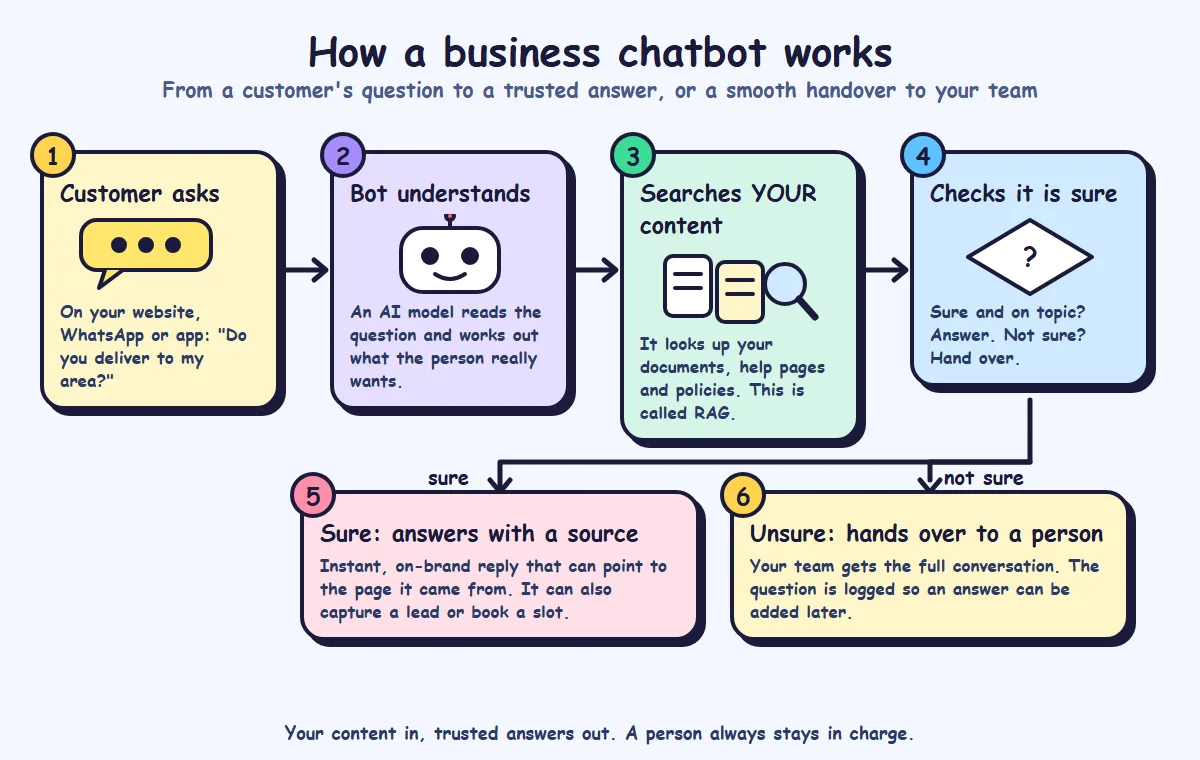
In plain steps:
- The customer asks a question on your website, a messaging channel or inside your app.
- The bot understands. An AI model reads the question and works out what the person wants, even if the wording is unusual.
- It searches your content. The bot looks up the best matching passages from your documents, help pages and policies. This technique is called retrieval-augmented generation, or RAG, and it is what keeps answers tied to your information.
- It checks it is sure. If the question is on topic and the content supports an answer, it replies. If not, it does not guess.
- When sure, it gives a clear, on-brand answer, can point to the page it came from, and can also capture a lead or offer a booking.
- When unsure, it hands the conversation to your team with the full history, and the question is logged so an answer can be added later.
The point of the diagram is the loop at the end: a person always stays in charge. The bot handles the routine, and people handle the rest.
Where chatbots really help
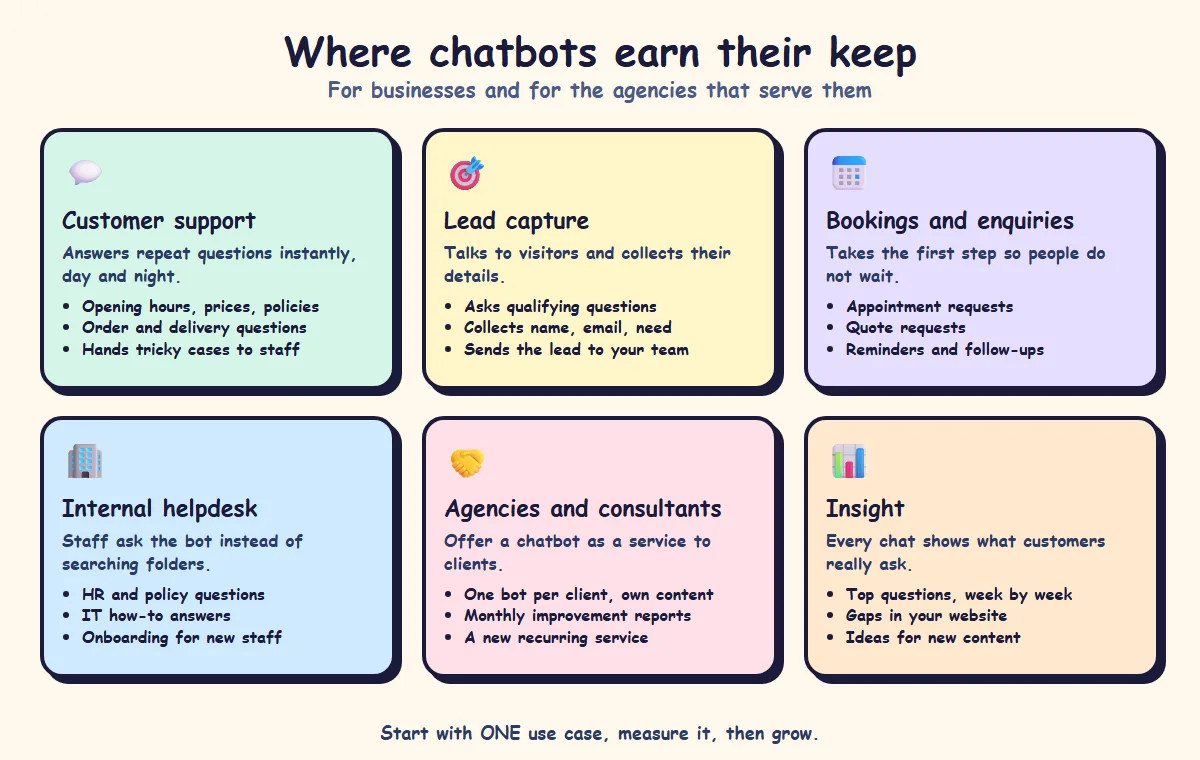
1. Customer support
Opening hours, prices, delivery, returns, how-to questions. The bot answers the repeat questions instantly, day and night, so your team spends its time on the cases that need a human.
2. Lead capture
Many website visitors never fill in a contact form. A chatbot can start a conversation, ask a few qualifying questions, such as what they need and when, and collect name and contact details. The lead then goes to your team with the conversation attached.
3. Bookings and enquiries
Appointment requests, quote requests and call-back requests can all start in chat. People do not have to wait for office hours to take the first step.
4. Internal helpdesk
Staff lose time searching for the leave policy, the IT how-to or the onboarding steps. An internal bot trained on those documents gives answers in seconds. Access control matters here, so staff only get answers from documents they are allowed to see.
5. Agencies and consultants
If you run a marketing, web or IT agency, a chatbot is a service you can offer clients. You set up one bot per client, trained on that client's own content, then report monthly on what customers asked and where the website is missing answers. It turns a one-off build into a recurring service.
6. Insight
Every conversation shows what customers really ask. Reading the top questions each week tells you where your website is unclear, which products people want and what to write about next.
What makes a chatbot trustworthy
| Quality | Why it matters |
|---|---|
| Trained on your own content | Answers match your real prices, policies and tone |
| Shows its source where useful | Customers and staff can check the answer |
| Limited to approved topics | It does not wander into advice you never gave |
| Hands over to a person | Hard or sensitive cases get a human, with the full history |
| Logs unanswered questions | You learn what to add next |
| Has an owner | Someone checks the answers and updates the content |
Honest limits
- It can still be wrong. Even with your content, an AI model can misread a question or a document. That is why handover, source links and regular review matter.
- It is only as good as your content. If your website is out of date or vague, the bot will be too. Fixing the content often improves your business before the bot is even live.
- It does not replace people. It removes the repetitive work. Sensitive cases such as complaints, health, legal or money questions should go to a person.
- Privacy needs a plan. Decide what customer data the bot sees, where conversations are stored and who can read them. If sending data to an outside AI service is a problem for you, read our guide on building your own business AI without OpenAI.
- It needs care after launch. Review conversations, add missing answers and update content when things change.
What chatbot app development involves
Building a good chatbot is more than plugging a model into a chat window. The usual steps are:
- Use-case and conversation design. Pick the first job for the bot, and write how the conversation should go, including when it hands over.
- Prepare your content. Gather the documents, help articles and policies the bot may use, and remove anything outdated.
- Build and train. Connect the content, set the allowed topics and tone, and build the chat experience.
- Integrate. Add it to your website or messaging channels and connect the tools your team uses, such as your email, CRM or booking system.
- Test with real questions. Use real customer questions, including awkward ones, and fix what fails.
- Launch, monitor and improve. Watch conversations, track unanswered questions and improve answers over time.
Our own AI chatbot development service follows this approach, using AI language model APIs, RAG pipelines, vector search and a Next.js, Node.js and PostgreSQL stack. A focused support or lead-capture chatbot can usually go live in a few weeks, with the exact timeline confirmed after a short discovery call.
What it means for your business or agency
- Pick one job first. Support, lead capture or bookings. Do it well before adding more.
- Count your repeat questions. List the ten questions your team answers most often. Those are your first conversations.
- Clean up your content. The bot can only be as accurate as the pages and documents behind it.
- Decide the handover rule. When must the bot pass to a person, and who receives it?
- Measure something simple. For example, how many chats were answered without a person, how many leads were captured and which questions had no answer.
- If you are an agency, package it. Offer setup, monthly review and content updates as a fixed service for each client.
A checklist before you build a chatbot
- What is the single first job of the bot?
- Which channels will it live on: website, messaging apps, your own app?
- Which content may it use, and who keeps that content up to date?
- Which topics must it never answer?
- When and how does it hand over to a person, and who is notified?
- What customer data will it see or store, and where?
- How will you test it with real questions before launch?
- Who reviews conversations after launch, and how often?
- How will you measure whether it is working?
How SimpleApp can help
We design and build chatbots trained on your own documents and website, with lead capture, smooth handover to a human and conversation analytics. We build for businesses and for agencies that want to offer chatbots to their own clients, and our clients own all the source code. See our AI chatbot development and AI-powered applications services, or ask for a free quote.