If you run a shop, an agency or a small service business and you feel like you are "behind" on AI, this guide is for you. The good news: most of what makes a difference is simple, a lot of it is free, and you do not need to be technical to start. This is a plain-English look at what AI is actually good at for an ordinary business, seven things you can try this week, the honest warnings, and how to tell when it is worth building something of your own.
Last updated: 2 November 2026. The figures below come from industry surveys, not official statistics, and are self-reported by business owners, so treat them as a clear direction rather than exact science. Please check the linked sources, and anything about your own data and privacy is your responsibility to confirm.
The short version
- AI is now normal for small businesses. Most already use it, and most say it saves them time.
- The wins are ordinary, not futuristic: writing, replying, summarising, sorting and answering common questions.
- Start free and simple. You can get real value this week without spending anything.
- Two rules keep you safe: always check what AI writes, and never paste private customer data into public tools.
- Build custom when a task becomes core. Free tools are for getting started; a reliable, private system built around your business is the next step.
This is not hype any more
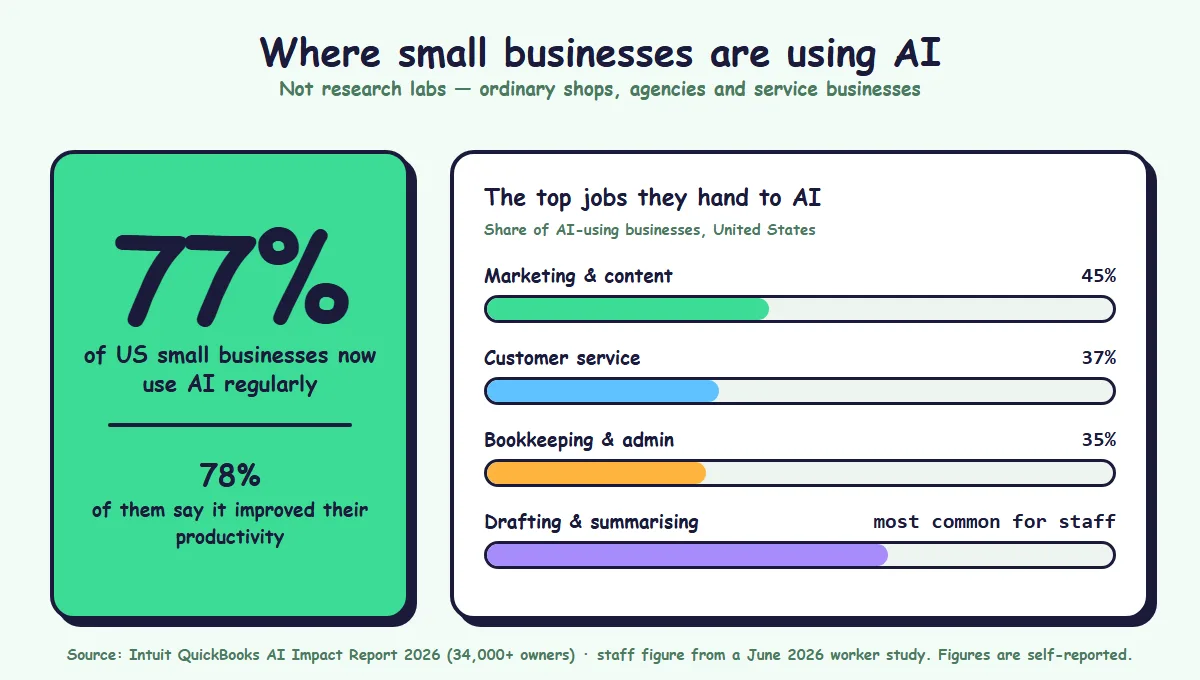
According to Intuit QuickBooks' 2026 AI Impact Report, based on a survey of more than 34,000 small and mid-size business owners, 77% of US small businesses now use AI regularly, up from 48% in mid-2024, and 78% of those users say it has improved their productivity. The most common uses are marketing (45% of AI-using businesses), customer service (37%) and bookkeeping (35%).
Other surveys give different numbers, as they always do. A Thryv survey from April 2026 put adoption at 66% and found that 53% of respondents spend at least 100 dollars a month on AI tools, alongside a real "training gap" where owners are not sure how to use the tools well. The exact figure depends on how you define "using AI", but the direction is not in doubt: this is now ordinary, not cutting edge.
The reassuring part: a worker study this year found the most common use among staff is simple personal productivity, such as drafting, summarising and brainstorming. In other words, most of the value is coming from small, practical tasks, not from anything complicated.
What AI is actually good at (and what it is not)
Before the how-to, a clear picture saves a lot of disappointment.
AI is genuinely good at:
- Turning rough notes into a first draft of writing.
- Rewriting the same message for different places (an email, a post, a flyer).
- Summarising long things into short ones.
- Answering common, repeated questions.
- Tidying and sorting messy text and data.
AI is not reliable at:
- Being correct about facts, prices or dates. It can sound confident and be wrong.
- Knowing anything private about your business unless you give it that information.
- Making judgement calls that need a human who knows the customer.
So the rule is simple: let AI do the first draft and the busywork, and keep a human for the final check and the judgement.
Seven things you can start this week
You can do all of these with a normal AI chat tool, most of them free. Treat every result as a draft to check, not a finished answer.
- Draft a week of social posts. Give it three or four bullet points about what is happening this week and ask for seven short posts in your tone. Edit and schedule.
- Reply to routine customer messages faster. Paste a common question and ask for a friendly, clear reply. Read it, fix anything wrong, and send.
- Turn one thing into five. Take a single blog post, notice or offer and ask for an email version, a short post, a WhatsApp message and a flyer caption.
- Summarise the long stuff. Paste a long email thread, a document or a pile of reviews and ask for the key points and anything that needs a decision.
- Get first-draft product descriptions and ad copy. Describe the product plainly and ask for three versions. Pick the best, make it true, make it yours.
- Tidy messy notes and spreadsheets. Ask it to turn rough notes into a clean list, or to spot duplicates and odd entries in a small table you paste in.
- Answer common questions automatically. A simple chatbot trained on your own prices, hours and policies can handle the repeat questions so you only deal with the real ones. Our guide on chatbot app development explains how that works.
Pick one. Do it for a week. Keep the one that actually saves you time.
Two warnings you must not skip
AI is useful, but two mistakes cause almost all the trouble.
- Always check what it writes. AI can produce a wrong price, a made-up fact or a confident but incorrect answer. Never send or publish something you have not read. For anything about money, law or safety, a person must decide.
- Do not paste private data into public AI tools. Customer details, contracts, financials and anything confidential should not go into a free public chatbot, because you often cannot control where that text ends up. When privacy matters, use tools that keep your data on your own side. Our guide on building your own private business AI explains how that is possible, and our warning about AI-powered scams covers the darker side of this technology.
Follow those two rules and you avoid nearly every problem people run into.
When free tools are enough, and when to build
Free and cheap AI tools are perfect for getting started and for small, occasional tasks. You should use them.
But there is a point where they stop being enough. It arrives when a task becomes core to your business, when it must be reliable every time, when it must stay private, or when it needs to fit how your business actually works rather than a generic template. At that point, a chatbot that forgets your latest prices, or a tool that sends your data to who-knows-where, becomes a liability instead of a help.
That is the moment to build something of your own: an assistant trained on your own documents, an automation that runs your real workflow, software that keeps your data on your side. It costs more than a free tool, and it is worth it exactly when the task is worth doing right.
What it means for your business
- Start this week, for free. Pick one of the seven tasks and try it. Momentum beats planning here.
- Make two rules non-negotiable. Check every output, and keep private data out of public tools.
- Measure one thing. Did it save you time or win you a customer? Keep what works, drop what does not.
- Train your team a little, often. The biggest gap is not the tools, it is knowing how to use them. A short, regular session helps more than one long one.
- Know your line. When a task becomes core, reliable-or-nothing, or private, move from a free tool to something built for you.
- Protect yourself. As AI helps you, it also helps scammers. Verify money and data requests, whatever the voice on the phone sounds like.
A simple checklist to get going
- Which one task eats the most of your time each week?
- Could AI do a useful first draft of it?
- Have you agreed that every output gets a human check?
- Have you agreed never to paste private customer data into public tools?
- Did you measure whether it actually saved time?
- Is this task becoming important enough to build properly and privately?
How SimpleApp can help
When AI stops being a free experiment and becomes part of how your business runs, we build it properly: private assistants trained on your own documents, automation that runs your real workflow, and AI features with human review and clear logs. See our AI-powered applications, AI chatbot development and business automation services, or get in touch and tell us the one task you would most like to take off your plate.