On 21 October 2026 the PHP project released emergency security updates, and headlines started saying that an AI-found bug put up to 70% of the world's websites at risk. The story is real, and the update matters, but the number needs context. This briefing explains what was found, what the 70% figure does and does not mean, and what an IT company or site owner should do today.
Last updated: 21 October 2026. This is based on the PHP project's own security advisory and the finder's published write-up. Details may change as more information appears, so please check the linked sources. Some news articles on this story are behind paywalls and we have not relied on them.
The short version
- PHP released fixes for two critical flaws. They are tracked as CVE-2026-109618 and CVE-2026-109619, and the PHP project says they can allow unauthenticated remote code execution.
- The flaws are in PHP itself. Applications such as WordPress do not need to be badly written to be exposed.
- Fixed versions: PHP 8.5.12, 8.4.27, 8.3.36 and 8.2.35. Backports for 7.4, 8.0 and 8.1 were published as minimal source patches.
- The "70%" is PHP's market share, not a count of vulnerable sites.
- Update, then restart. The PHP project says updating is the only safe choice.
What happened
According to the PHP project's security advisory of 21 October 2026, two vulnerabilities in PHP can allow unauthenticated remote code execution. In plain terms, someone on the internet could run their own code on a vulnerable web server, without logging in.
The advisory describes them like this:
- CVE-2026-109618: out-of-memory handling can interrupt PHP while internal request data is only partly set up, and cleanup can then treat the invalid data as valid.
- CVE-2026-109619: internal request state can survive after its memory has been freed, and a later request handled by the same worker may use that stale state.
An earlier pre-release notice rated both at CVSS v4.0 9.2, which is critical.
The security firm Wiz published its own account, PHP2Shell. Wiz says four related memory-safety bugs are grouped under the two CVEs, that they affect nearly every PHP version back to 5.4, and that a simple "Hello World" application on an affected version can be vulnerable because the flaw sits below the application code. Wiz says it built proof-of-concept attacks against WordPress, Drupal and Joomla. Its page does not report attacks in the wild, but that can change quickly, so treat the flaws as urgent.
What the "70% of websites" figure means
PHP is very widely used. W3Techs showed PHP used by 69.3% of websites whose server-side language is known, on 21 October 2026. That is where the headline number comes from.
It is not a measurement of how many sites are vulnerable. A site is only exposed if it runs an unpatched PHP version that serves web requests, and some hosts apply updates or mitigations for their customers. Wiz's own headline also uses the 70% figure, and its page gives no separate source for it. The honest reading is: the flaw is in software that most websites use, so the potential reach is very large, and the real number of vulnerable sites is unknown.
Who is affected
The PHP advisory says the issue affects all PHP installations serving web requests, including PHP-FPM, Apache with mod_php, php-cgi, FrankenPHP and LiteSpeed. The risk is highest with mod_php, where a demonstrated exploit can trigger the attack before any application code runs.
Important details:
- Older versions. PHP 8.1 and older no longer receive updates from the PHP project. Some Linux distributions and long-term-support vendors provide their own backported fixes, so check with your vendor or upgrade.
- PHP 8.2 reaches end of life on 31 December 2026, so plan an upgrade to a supported version soon.
- Your own app code is not the cause. Because the bug is in the PHP engine, plugin hygiene alone does not protect you.
- Not every site is PHP. Sites built with Node.js, Python or other stacks are not affected by this specific flaw, although a server may still run PHP for other tools.
How AI was involved
Wiz says it used AI tools throughout, including its own Wiz Atlas system and the models Gemini 4 Argon and GPT-5.6 Sol. According to its write-up, the models contributed to discovery, exploit development, attack detection and patch validation, and helped adapt attacks to different PHP versions and configurations.
Wiz also lists a timeline. It says it found the first flaw on 19 August 2026, confirmed remote code execution on Drupal and WordPress by 21 August, reported the problems to the PHP security team on 24 August, and that PHP acknowledged them on 21 September. Public disclosure came with the patched releases on 21 October. These dates come from Wiz, not from an independent source.
The lesson for IT teams is not that AI is magic. It is that finding and exploiting bugs is getting faster, so the time between disclosure and attack may shrink. Patch routines need to be quick.
What to do today
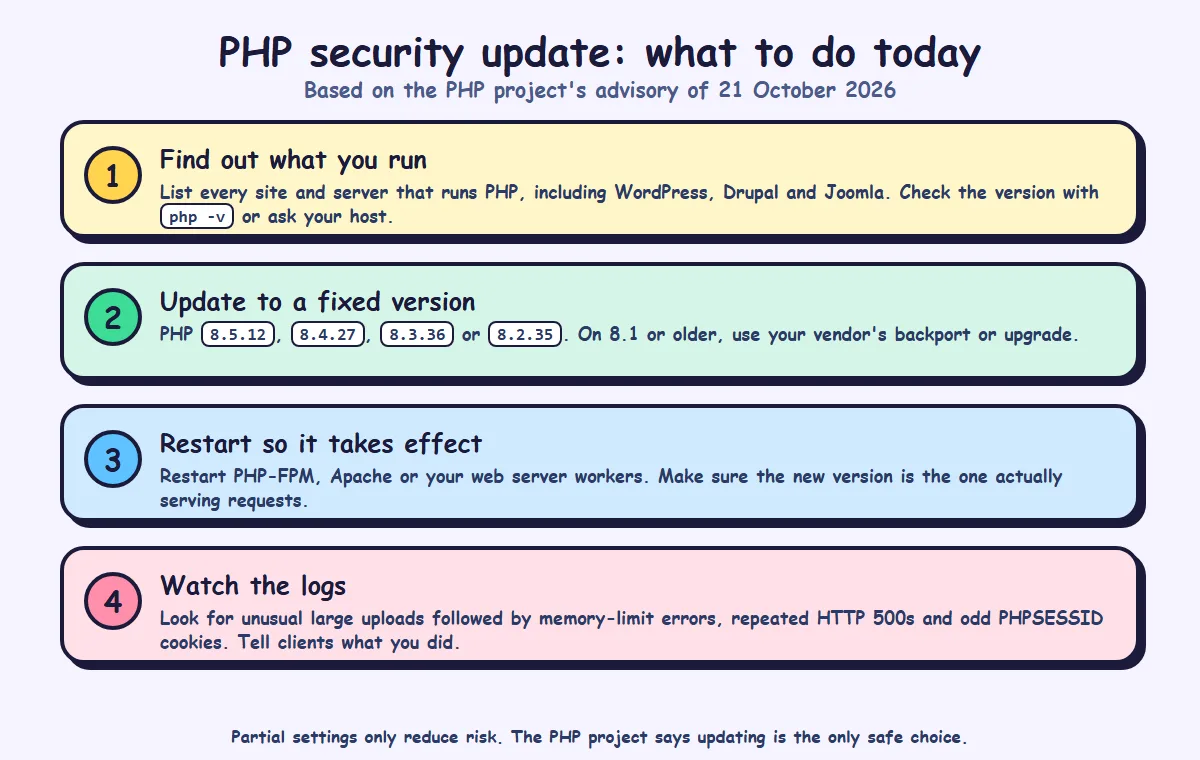
- Find out what you run. List every website, server and container that runs PHP, including WordPress, Drupal and Joomla sites. Check the version with the command php -v, in your hosting panel, or ask your host.
- Update to a fixed version. Move to PHP 8.5.12, 8.4.27, 8.3.36 or 8.2.35. If you are on 8.1 or older, use your vendor's backport or upgrade to a supported version.
- Restart so it takes effect. Restart PHP-FPM, Apache or whichever workers serve PHP, and confirm the new version is the one answering requests.
- Watch the logs. Wiz suggests looking for unusual multipart upload requests followed by memory-limit errors or repeated HTTP 500 responses, unusually large or malformed PHPSESSID cookies, and unexplained PHP worker restarts. It warns that application logs may show little because the activity happens below the application layer.
- Tell your clients. A short note on what you checked and updated builds trust.
If you cannot update immediately
The PHP advisory lists partial measures, and says they "do not make an installation safe". They include setting memory_limit to -1 in a way applications cannot override, limiting post_max_size, turning off session upload progress before request parsing, and on PHP 8.5 turning off fatal error backtraces, each followed by a restart of every worker. It also warns against certain process memory limits because they can trigger the vulnerable condition. Read the full list in the advisory before changing anything. According to Wiz, vendors including Cloudflare, Google, AWS and Microsoft published their own guidance and mitigations, so check whether your host or CDN offers protection while you update.
What it means for your IT company
- Make a PHP inventory today. Many agencies host old client sites they have forgotten. Find them before someone else does.
- Patch in order of exposure. Public-facing sites first, then admin panels and staging servers that are reachable from the internet.
- Check your hosting. Managed hosts may patch for you, but confirm it in writing. Shared and self-managed servers may need your action.
- Plan the end-of-life work. PHP 8.1 and older are already unsupported and PHP 8.2 ends on 31 December 2026. Offer clients an upgrade plan.
- Update your incident routine. If you manage client sites, decide who watches for new advisories and how fast you patch critical ones.
- Keep backups and logs. If something goes wrong, you need a clean restore point and the records to see what happened.
- Offer maintenance as a service. Regular patching, monitoring and reporting is exactly what software and website maintenance covers.
A patch checklist for this week
- List all PHP sites, servers and containers, including old and staging ones.
- Record the PHP version on each.
- Update to 8.5.12, 8.4.27, 8.3.36 or 8.2.35, or apply your vendor's backport.
- Restart workers and confirm the running version.
- Check hosting and CDN advisories for extra protection.
- Review logs for the signs listed above.
- Make a plan for anything on PHP 8.1 or older, and for PHP 8.2 before its end of life.
- Notify affected clients and document what you did.
How SimpleApp can help
We build custom software and web applications and offer maintenance and support with updates, monitoring and clear reporting. If you want help checking your sites or planning a PHP upgrade, see our maintenance and support and web application development services, or get in touch.