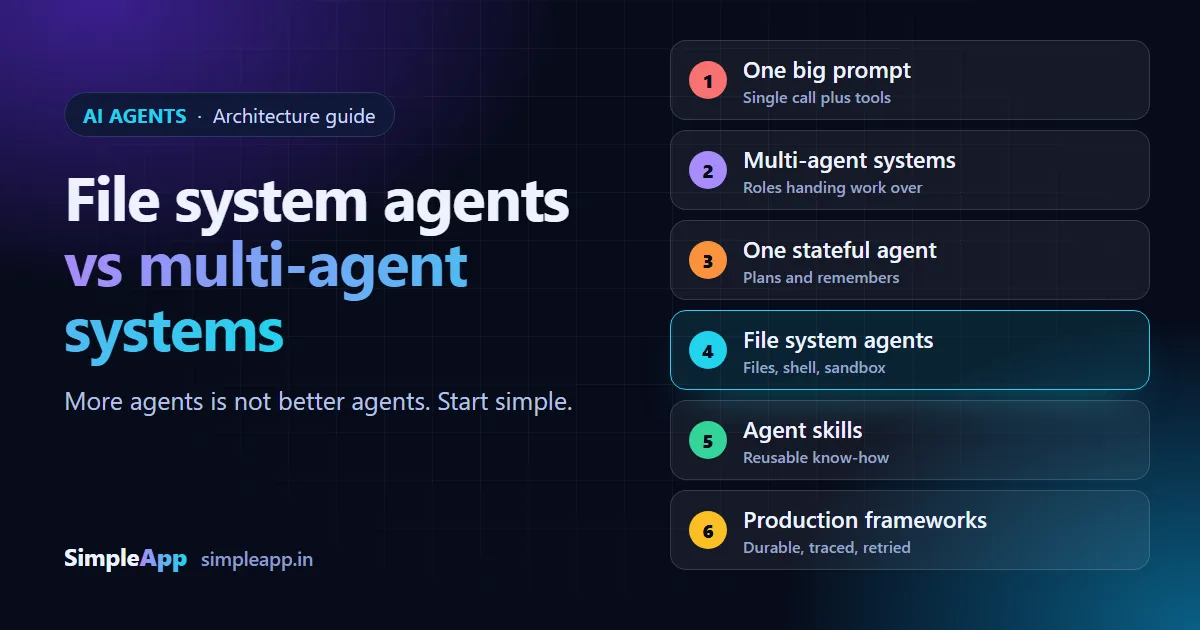
"We need a multi-agent system" is becoming a common sentence in client meetings. Often it is the wrong starting point. This guide explains the six common ways to build an AI agent, from a single prompt to a production runtime, the open-source tools in each, and a simple way to decide which one your project needs.
The grouping below follows an infographic by AI engineer Dr. Maryam Miradi (see maryammiradi.com), whose headline message is that a file system can beat a multi-agent system. The explanations, the decision guide and the advice are ours. The tool descriptions come from each project's own page on GitHub, so please check the linked pages for current features and licences before choosing anything.
Last updated: 15 October 2026. This space changes quickly, so versions, features and licences may have changed since this was written.
The short version
- Start simple. One well-written prompt with the right tools solves more problems than most teams expect.
- Add structure only when a real problem forces it. Long tasks need state. Big jobs may need several specialists. Risky actions need a sandbox.
- A file system is a powerful shortcut. An agent that can read and write files, run commands in a safe sandbox and load reusable skills can replace a surprising amount of multi-agent plumbing.
- Production is a separate problem. Durable workflows, retries and tracing matter more than which agent framework you picked.
The six architectures
1. One big prompt
A single call to a model, with the right instructions and the right tools around it. There is no agent loop to manage. This suits summarising, classifying, extracting data and drafting text.
- Vercel AI SDK is a provider-agnostic TypeScript toolkit for AI applications and agents.
- LiteLLM is an open-source AI gateway that lets you call 100+ model providers in the OpenAI format, as a Python library or a self-hosted proxy.
- Instructor is a Python library that gets structured, validated data out of a model using Pydantic models.
Choose it when the task has one clear step and a predictable answer.
2. Multi-agent systems
Several agents, each with a role, passing work to one another. It looks natural on a diagram, but every extra agent adds cost, delay and more places for mistakes to hide.
- LangGraph describes itself as a low-level framework for long-running, stateful agents.
- CrewAI is a Python toolkit for teams of agents, with Crews for collaboration and Flows for event-driven control.
- Google ADK is a Python toolkit for developing, evaluating and deploying agents.
- OpenAI Agents SDK is a lightweight framework for multi-agent workflows that also works with other model providers.
Choose it when the work really splits into separate roles with different tools, permissions or models, and one agent cannot hold it all.
3. One stateful agent
A single agent that keeps state between steps: it plans, remembers what it did and continues a long task. This is often what teams actually need when they think they need many agents.
- PydanticAI is a Python SDK for building typed agents across many model providers.
- Deep Agents is an open-source, ready-to-use agent harness that you can extend or replace.
- Mastra is a TypeScript framework for AI applications and agents.
Choose it when the task is long or has several steps but still has one owner.
4. File system agents
An agent that works the way a developer does: it reads files, writes files, runs commands and keeps notes in a folder. Instead of passing messages between many agents, the work lives in files that you can open, search and review.
- Claude Code is an agentic coding tool that runs in your terminal and works with your codebase.
- just-bash provides a simulated bash environment with a virtual file system, described as "Bash for Agents".
- Vercel Sandbox runs code in isolated, short-lived Linux virtual machines.
Choose it when the job is about documents, code, data files or reports, and you want to see exactly what the agent did. Always pair it with a sandbox and no production secrets.
5. Agent skills
Skills are folders of instructions, scripts and resources that an agent loads only when a task needs them. A skill is how you teach an agent "how we do things here" without writing a new agent.
- Anthropic Skills holds example skills for Claude, provided for demonstration and education. Its licensing is mixed, so read it before reuse.
- Skills CLI installs and manages skills across several coding agents.
- Agent Skills from Vercel Labs is a collection of skills for coding agents.
Choose it when you have repeatable company know-how, such as your code review rules, your report format or your deployment steps.
6. Production frameworks
Once an agent works on your laptop, the hard part starts: what happens when a step fails, the server restarts or a customer asks what the agent did last Tuesday.
- eve is described as a file-system-first framework for durable AI agents.
- Workflow DevKit makes TypeScript and JavaScript functions durable, with saved progress, retries and built-in observability.
- OpenTelemetry for JavaScript collects traces, metrics and logs from your applications.
Choose it when the agent will run for real users, handle money or data, or must be explained to an auditor.
How to choose
| Your situation | Start with |
|---|---|
| One step, a predictable answer | One big prompt |
| Several steps, one owner | One stateful agent |
| Work on code, documents or data files | File system agent with a sandbox |
| Company rules to repeat every time | Agent skills |
| Separate roles with different permissions | Multi-agent system |
| Real users, real data, real audits | A production framework on top of any of the above |
This table is our own rule of thumb, not a standard.
What it means for your IT company
- Ask "what is the simplest thing that could work?" first. Write the one-prompt version before drawing agent diagrams. If it passes your tests, you may be done.
- Count the cost of every extra agent. More agents mean more model calls, more delay, more logs to read and more ways to fail. Add one only for a reason you can write down.
- Keep work in files where you can. Files are easy to review, diff, back up and hand over to a client.
- Sandbox everything that runs commands. No production secrets, no unrestricted network access, and a person approves risky steps. See our briefing on AI coding tools for security checks.
- Turn your know-how into skills. Your code review checklist or release routine is worth writing once and reusing.
- Plan for production from day one. Decide early how you will log, retry, trace and roll back.
- Check licences. Some projects mix open-source and source-available parts, and a few have separate enterprise licences. Read them before building a client product on top.
A checklist before you build an agent
- Can one prompt with tools do this job? Test it first.
- What is the single outcome the agent must produce, and how will you test it?
- Does it need to remember things across steps? If so, which state, and where is it stored?
- Does it touch files or run commands? Put it in a sandbox.
- Which parts of your company know-how could become reusable skills?
- What happens when a step fails, and who can see what the agent did?
- Is there a human approval step before anything irreversible?
How SimpleApp can help
We design and build AI features and agents, starting with the simplest version that works, with testing, human review and clear logs. See our AI-powered applications and custom software development services, or ask for a free quote.